llms.txt and robots.txt: How to Tell AI Crawlers What to Read

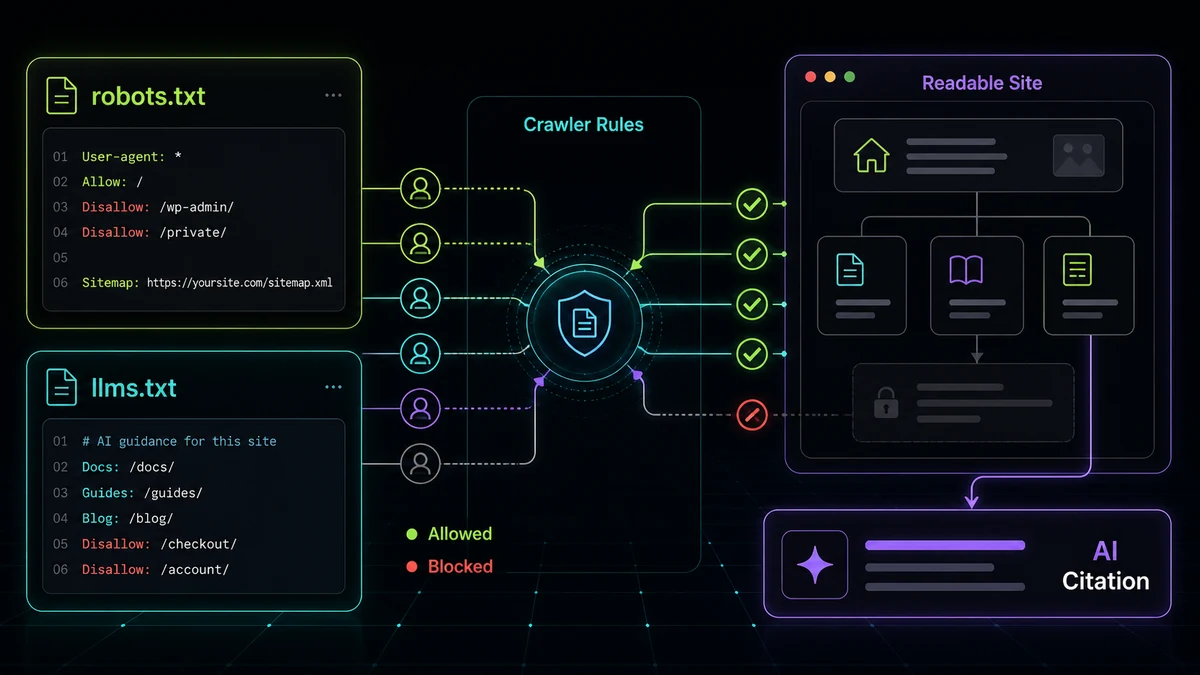
Two plain-text files at the root of your domain decide how AI crawlers treat your site: robots.txt (around for 30 years) and llms.txt (brand new). Most business owners have never touched either, and a surprising number are accidentally blocking the exact AI crawlers they want citing them.
Here’s what each file does, how to check whether yours is quietly costing you AI visibility, and copy-paste templates for both. If you’d rather not edit them by hand, our robots.txt analyzer and llms.txt generator do each job in a couple of minutes, but it’s worth understanding what they’re doing.
robots.txt: the file that might be hiding you from AI
robots.txt is a set of instructions, at yourdomain.com/robots.txt, telling crawlers what they may and may not access. AI crawlers respect it the same way search crawlers do, which means an overzealous rule can quietly remove you from AI answers entirely.
The trap is rarely a deliberate block. It’s usually one of these:
- A theme or plugin shipped a restrictive default years ago and nobody revisited it.
- Someone copied a
robots.txtoff another site without reading it. - A blanket
Disallowaimed at one scraper catches the legitimate AI crawlers too.
Before you can fix the file, this is the same readability problem we cover in why ChatGPT can’t see your website, except here the content is fine; the permission is the issue.
The trap nobody warns you about: blocking the wrong bot
Here’s the mistake that costs the most AI visibility. OpenAI runs two crawlers, and they do different jobs:
- GPTBot: gathers data primarily for training future models. (OpenAI’s bot documentation details each one.)
- OAI-SearchBot: the crawler behind ChatGPT’s live search and browsing.
If you want to opt out of training but stay visible in ChatGPT’s answers, you’d allow OAI-SearchBot and disallow GPTBot. Plenty of sites do the opposite by accident (block both, or block the search bot) and then wonder why ChatGPT never names them.
The AI crawlers that matter in 2026
These are the user-agents worth knowing, each controllable independently in robots.txt:
- GPTBot and OAI-SearchBot: OpenAI (training; search)
- ClaudeBot and anthropic-ai: Anthropic
- PerplexityBot: Perplexity
- Google-Extended: Google’s AI training token. Important nuance: this is separate from
Googlebot. BlockingGoogle-Extendedopts you out of AI training without affecting your normal Google Search ranking. - Applebot-Extended, Bytespider, Meta-ExternalAgent, Amazonbot: Apple, ByteDance, Meta, Amazon.
A reasonable default for a business that wants to be found: allow the search-oriented crawlers, and decide on the training-only ones separately. If you want to stay visible in AI answers, the worst move is blocking everything.
A simple “allow the AI crawlers that cite you” robots.txt looks like this:
User-agent: *
Allow: /

Sitemap: https://www.yourdomain.com/sitemap-index.xml
That permissive baseline keeps you readable; you then add specific Disallow rules only for crawlers you’ve deliberately decided to block. The robots.txt analyzer shows you, line by line, which AI crawlers your current file allows or blocks, and generates a corrected version for allow-all, search-only, or full-block.
llms.txt: the new standard for guiding AI
Where robots.txt controls access, llms.txt offers guidance. Proposed in 2024 (you can read the spec at llmstxt.org), it’s a Markdown file at yourdomain.com/llms.txt that hands large language models a curated map of your most important pages (your services, your best content, your contact page) without making them wade through navigation and boilerplate to find it.
Think of robots.txt as the locked doors and llms.txt as the hand-drawn map you leave at the entrance. Adoption is still early (not every AI crawler consumes it yet), but companies like Anthropic, Vercel, and Mintlify already publish one, and it’s a low-effort, forward-looking signal. Most sites still don’t have it, which makes publishing now an early-mover move.
A minimal llms.txt looks like this:
# Your Business Name

> One-sentence description of what you do and who you serve.

## Services
- [Service Page](https://www.yourdomain.com/services/): What it is, in one line.

## Company
- [Home](https://www.yourdomain.com/): What visitors find here.
- [Contact](https://www.yourdomain.com/contact/): How to get in touch.
Keep it curated, not exhaustive: the point is to point models at what matters. The llms.txt generator builds a properly-formatted file from your URLs in a couple of minutes.
Audit both in five minutes
Two files, fifteen minutes of work, real impact on whether AI engines can find and read you:
- Check your robots.txt: confirm you’re not blocking the AI crawlers you want citing you, and decide the training-crawler question on purpose.
- Publish an llms.txt: give the models a clean map while most of your competitors still don’t have one.
Both are part of the larger picture of answer engine optimization, the technical foundation that decides whether AI assistants can read, trust, and cite your business. For an initial overview, start with the free AI visibility score. A full audit helps scope the fixes when there’s a fit for implementation work with Josh.