Why ChatGPT Can't See Your Website (and the 3 Fixes That Matter)

GPTBot made 569 million requests across Vercel’s network in a single month.
Most of them weren’t readable.
Here’s what nobody told the marketing industry: ChatGPT, Claude, and Perplexity don’t browse the web the way Google does. They don’t run JavaScript. They don’t wait for animations to finish. They don’t scroll. They send a request, take whatever the server hands back, and leave.
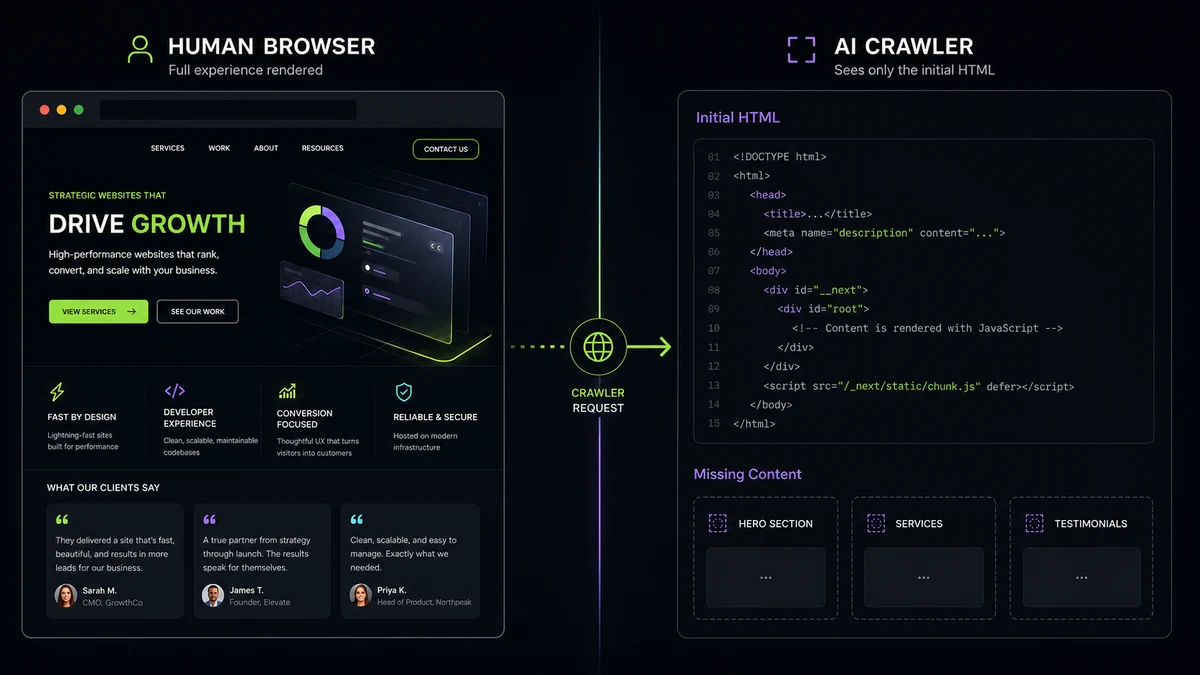
If your site was built on a JavaScript framework that renders content after the page loads (React without server-side rendering, plenty of WordPress themes with heavy JS plugins, most page builders), what AI crawlers actually see looks something like this:
[empty divs]
“Loading…”
[no actual content]
That’s it. The hero copy your designer agonized over, the service descriptions you rewrote four times, the testimonials that took three months to collect. All of it invisible.
Then they leave, and the user’s question gets answered with content from a competitor whose site they could read.
The asymmetric opportunity
This sounds bad, and for most established businesses, it is. But here’s the asymmetric thing: AI search isn’t a winner-takes-most game yet.
Google rewards backlinks accumulated over years, content volume, domain age, and authority. It’s a moat that takes a decade to build. AI crawlers reward something simpler: can they read your site at all?
The cost to compete is much lower than SEO ever was. The catch is that the requirements are different. And every quarter you wait, more competitors figure them out.
The three things that decide whether you’re visible to AI
Three factors determine whether AI crawlers can answer questions about your business:
- Server-side rendering. Whatever appears in the initial HTML response is what AI crawlers see. If your content fades in via JavaScript, it doesn’t exist as far as GPTBot is concerned.
- Schema markup. Structured data tells AI engines what your business does, where it’s located, what services it offers, all in a machine-readable format. A site without schema sends nothing.
- Concise, factual copy in the first 200 words. AI cites whoever answers the question first and clearly. Brochure-style “We’re passionate about delivering excellence” copy gets skipped in favor of a competitor’s “We maintain commercial HVAC systems under annual contracts, with a technician on site within 24 hours.”
Most sites built on WordPress with heavy plugins fail the first test. Most sites built before 2024 fail the second. Most sites designed to feel premium fail the third.
What AI crawlers actually see (versus what your browser shows)
To make the gap concrete: here’s a side-by-side of what a typical service-business site presents to a human visitor in a browser, versus what GPTBot, ClaudeBot, or PerplexityBot receives from the same URL.
The browser renders the full page: hero copy, services grid, customer testimonials, address and hours, contact form. The AI crawler, which doesn’t execute JavaScript and doesn’t wait for client-side hydration, often gets something much thinner:
- Hero copy: empty if it’s JavaScript-rendered after page load
- Service descriptions: empty or partial if they live behind “View More” lazy-loaders
- Address and hours: present in the HTML but unstructured: without LocalBusiness schema, the crawler has no way to read “1234 Main St” as a business address
- Customer testimonials: empty if they’re loaded by a carousel widget on initialization
- Contact form: present, but with no schema connecting it to a business identity
Most site owners don’t know this gap exists, because Google rankings still work: Google runs JavaScript before indexing. AI crawlers do not.
The fix sequence is well-documented and not particularly long:
- Server-render the hero and key service blocks so the content appears in the initial HTML response, not after page load
- Add LocalBusiness, Service, and FAQPage schema so the crawler can identify what your business is and what it does
- Move testimonials and other content-bearing UI out of carousels and accordions into the page body so the crawler doesn’t have to execute JavaScript to see them
A developer who has done this work before can ship all three in roughly a day.
The window
Run a few searches in ChatGPT for “best [your service] in [your market]” yourself. You’ll find that citations often diverge from Google’s top rankings, and that the businesses being named are frequently the ones that gave AI crawlers something readable and clearly structured to work with, not necessarily the ones paying the most for ads. That divergence is the opportunity.
That’s the transition moment. The advantage goes to whoever moves first, and the cost to move is much lower than it will be in two years when this becomes table stakes.
To start checking what AI crawlers can read on your site, run the free AI visibility score. If you want help addressing the findings, Josh reviews your free AI visibility score and discusses your goals by email. A full audit helps scope the implementation once there’s a fit for the work.