The 5 Schema Types Every Service Business Should Have

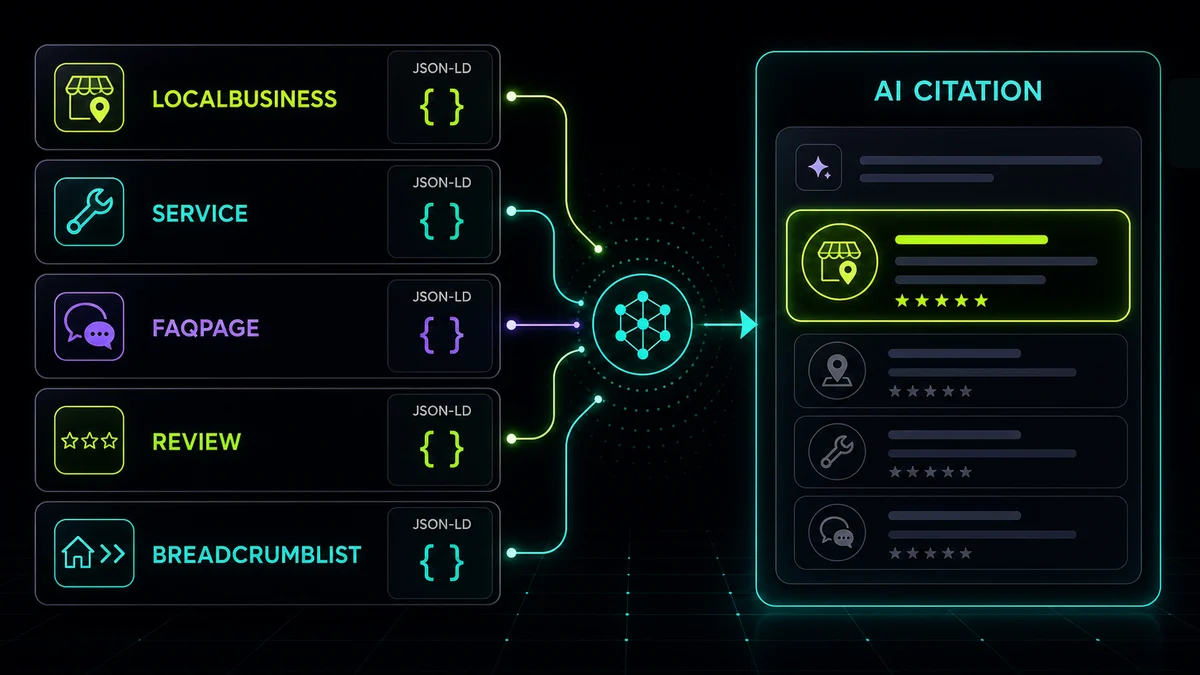
AI search engines now decide whether to cite your business when a buyer asks ChatGPT, Perplexity, Claude, or Google’s AI Overviews a service-intent question: “which commercial HVAC contractors should we consider,” “who handles facilities maintenance for multi-site operators,” “I need an employment attorney for a 300-person company.” The mechanism that decides whether you get named in the answer is schema markup: structured JSON-LD embedded in your HTML that tells AI crawlers what your business is, where it operates, what it costs, and how to evaluate it.
Schema sits in a corner of the technical stack most agencies and freelancers don’t touch, which is why most service-business websites, even ones built recently and at significant expense, have very little of it. This is the labeling layer the AI search transition has made consequential, and the cost to implement it is low.
This post is the technical follow-up to Why ChatGPT Can’t See Your Website. Server-side rendering was the foundational fix there (making sure your content shows up in the initial HTML response at all). Schema is the layer on top: once AI crawlers can read your page, schema tells them what every part of it means. Without it, you’re unlabeled text that the engine has to guess at. With it, you’re a labeled dataset the engine can confidently reason about.
Five schemas, each with a paste-ready JSON-LD block. Implementation time for all five: about an afternoon for a developer who’s done it before, a day if it’s their first time. If you’d rather generate the markup interactively, our free Schema Generator produces the LocalBusiness and FAQ blocks directly: fill in the form, copy the output, paste into your <head>.
1. LocalBusiness, but with areaServed geometry, not just an address
Most sites that have any schema have a basic LocalBusiness block with name, address, and phone. That’s the floor. What separates a serviceable LocalBusiness schema from a strong one is areaServed with actual geometry (a GeoCircle or GeoShape) instead of just a postal address.
Here’s why this matters for service businesses: your physical office is in one location, but you serve customers across a wider radius. A PostalAddress tells AI engines where your office is. areaServed with a GeoCircle tells them where you’ll actually show up to do work. When an AI engine answers “commercial HVAC contractors that cover [a specific suburb],” it filters on service area, not office address.
{
  "@context": "https://schema.org",
  "@type": "HVACBusiness",
  "name": "Northline Commercial HVAC",
  "url": "https://www.northline-commercial-hvac.com/",
  "telephone": "+1-614-555-0100",
  "image": "https://www.northline-commercial-hvac.com/og.jpg",
  "address": {
    "@type": "PostalAddress",
    "streetAddress": "1234 Industrial Pkwy",
    "addressLocality": "Columbus",
    "addressRegion": "OH",
    "postalCode": "43228",
    "addressCountry": "US"
  },
  "geo": {
    "@type": "GeoCoordinates",
    "latitude": 39.9450,
    "longitude": -82.9800
  },
  "areaServed": {
    "@type": "GeoCircle",
    "geoMidpoint": {
      "@type": "GeoCoordinates",
      "latitude": 39.9612,
      "longitude": -82.9988
    },
    "geoRadius": "80000"
  },
  "priceRange": "$$",
  "openingHoursSpecification": [{
    "@type": "OpeningHoursSpecification",
    "dayOfWeek": ["Monday", "Tuesday", "Wednesday", "Thursday", "Friday"],
    "opens": "07:00",
    "closes": "18:00"
  }]
}
Replace HVACBusiness with the most specific subtype that fits: Plumber, Electrician, RoofingContractor, LegalService, AccountingService, MedicalClinic, etc. Schema.org’s LocalBusiness page has the full subtype tree. The more specific the type, the better AI engines can match it to intent queries. (Our Schema Generator handles this whole block interactively if you want to skip the hand-edit.)
No storefront? Use Organization instead
A company that sells nationally with no location customers visit should not claim a LocalBusiness type or a service radius. The same declaration takes the Organization shape: the address is the headquarters, areaServed is a country or a list of states, and there is no geo, no openingHoursSpecification, and no priceRange. The weight shifts to sameAs and knowsAbout, because engines verify a national company through its profiles rather than its map pin.
{
  "@context": "https://schema.org",
  "@type": "Organization",
  "name": "Crestline Freight Systems",
  "url": "https://www.crestline-freight-systems.com/",
  "logo": "https://www.crestline-freight-systems.com/logo.png",
  "description": "Temperature-controlled freight and warehousing for food and pharmaceutical shippers across the United States.",
  "telephone": "+1-312-555-0100",
  "address": {
    "@type": "PostalAddress",
    "streetAddress": "1234 Commerce Dr",
    "addressLocality": "Chicago",
    "addressRegion": "IL",
    "postalCode": "60607",
    "addressCountry": "US"
  },
  "areaServed": {
    "@type": "Country",
    "name": "United States"
  },
  "sameAs": [
    "https://www.linkedin.com/company/crestline-freight-systems",
    "https://www.crunchbase.com/organization/crestline-freight-systems"
  ],
  "knowsAbout": [
    "Temperature-controlled freight",
    "Cold chain warehousing",
    "FSMA compliance"
  ]
}
Put every profile you actually control in sameAs, including the trade directories and association listings your industry uses. Entity SEO explains why those links and knowsAbout carry the verification for a company without a storefront, and the Entity Check reports which of them your homepage is missing. The four blocks below work the same for both shapes. For a national company, set the Service block’s areaServed to the same Country and pull reviews from the platforms your buyers use rather than a map listing.
2. Service: one block per offering, with priceRange and areaServed
LocalBusiness tells engines what your company is. Service tells them what you actually do. Most service-business sites have a “Services” page listing six to ten offerings, and none of them are individually marked up.
Each service should be its own Service schema, ideally embedded on its dedicated page:
{
  "@context": "https://schema.org",
  "@type": "Service",
  "serviceType": "Commercial HVAC preventive maintenance",
  "name": "Commercial HVAC Preventive Maintenance Contracts (Central Ohio)",
  "description": "Scheduled inspection and maintenance of rooftop units, chillers, and air handlers across single and multi-site facilities, including filter changes, coil cleaning, and refrigerant checks. Quarterly or monthly visits.",
  "provider": {
    "@type": "HVACBusiness",
    "name": "Northline Commercial HVAC",
    "url": "https://www.northline-commercial-hvac.com/"
  },
  "areaServed": {
    "@type": "AdministrativeArea",
    "name": "Franklin County, Ohio"
  },
  "offers": {
    "@type": "Offer",
    "priceCurrency": "USD",
    "priceSpecification": {
      "@type": "PriceSpecification",
      "priceCurrency": "USD",
      "minPrice": 2400,
      "maxPrice": 18000
    }
  }
}
The price range matters more than people expect. AI engines weight businesses that publish price ranges as more transparent than those that don’t, and “best [service] under $X” is a common query pattern. (Schema.org’s Service spec lists the full optional field set if you want to go deeper than the essentials above.)
3. FAQPage: the underrated one AI cites heavily
FAQPage schema is the highest-leverage schema on this list. ChatGPT, Perplexity, and Google’s AI Overviews cite FAQ answers more frequently than any other content type because the question/answer format mirrors how users phrase prompts. If your site doesn’t have an FAQ section, build one. If it does, mark it up.
Pick the eight to twelve questions your sales team actually answers on every call. Don’t make them up.
{
  "@context": "https://schema.org",
  "@type": "FAQPage",
  "mainEntity": [
    {
      "@type": "Question",
      "name": "How much does a commercial HVAC maintenance contract cost?",
      "acceptedAnswer": {
        "@type": "Answer",
        "text": "Most annual preventive maintenance contracts for a single commercial building fall between $2,400 and $18,000 a year, depending on the number of rooftop units and air handlers, visit frequency, and whether filters and refrigerant are included. Multi-site portfolios are quoted per location."
      }
    },
    {
      "@type": "Question",
      "name": "How long does a rooftop unit replacement take?",
      "acceptedAnswer": {
        "@type": "Answer",
        "text": "Most single rooftop unit replacements are completed in one working day once the crane is scheduled. Replacing several units across a site typically takes two to four days."
      }
    }
  ]
}
Keep answers to two to four sentences. Long answers don’t help; concise answers get quoted verbatim. The Schema Generator produces FAQ blocks directly: paste your Q&A pairs in, copy the JSON-LD out.
4. Review / AggregateRating, but only if the reviews are real
This is the schema most sites get wrong, and Google has been actively penalizing the mistakes. The rule (laid out in Google’s review snippet guidelines) is straightforward: you can only mark up reviews that are independently verifiable and currently displayed on the page. Five fake testimonials with star ratings on your homepage will get flagged as deceptive markup, and you’ll lose the rich result eligibility.
If you have a real review section pulling from Google Business Profile, Clutch, G2, or a verified collection tool, mark up the AggregateRating that matches it:
{
  "@context": "https://schema.org",
  "@type": "HVACBusiness",
  "name": "Northline Commercial HVAC",
  "aggregateRating": {
    "@type": "AggregateRating",
    "ratingValue": "4.8",
    "reviewCount": "147",
    "bestRating": "5"
  }
}
reviewCount must match the count you actually display. ratingValue must match the average of those displayed reviews, not your Google Business Profile total unless those reviews are also embedded on the page. When in doubt, omit this one until your review collection is in order.
5. BreadcrumbList: low effort, high indexing benefit
This is the easiest schema on the list, and most sites still don’t have it. BreadcrumbList tells search and AI engines the hierarchical structure of your site, which dramatically improves how deep pages get indexed and how they appear in search results.
Place this on every page below the homepage. Most CMSes and modern frameworks can generate it dynamically from URL structure.
{
  "@context": "https://schema.org",
  "@type": "BreadcrumbList",
  "itemListElement": [
    {
      "@type": "ListItem",
      "position": 1,
      "name": "Home",
      "item": "https://www.northline-commercial-hvac.com/"
    },
    {
      "@type": "ListItem",
      "position": 2,
      "name": "Services",
      "item": "https://www.northline-commercial-hvac.com/services/"
    },
    {
      "@type": "ListItem",
      "position": 3,
      "name": "Preventive Maintenance",
      "item": "https://www.northline-commercial-hvac.com/services/preventive-maintenance/"
    }
  ]
}
The order I’d implement these in
If you only have an afternoon:
- BreadcrumbList first: fastest win, deploys site-wide once.
- LocalBusiness with
areaServed(or Organization for a company with no storefront): the foundational identity block. - FAQPage on your top-trafficked page: the highest AI citation lift per hour spent.
- Service on each service page: closes the offering loop.
- AggregateRating only if your reviews are clean; skip this until they are.
The whole stack runs about $0 in tools and four to six hours of developer time. Validate each block in Google’s Rich Results Test before deploying to production. It catches the silent typos schema.org’s validator misses. Once these are live, AI engines have enough labeled data to confidently identify your business, what you offer, where you operate, and how to evaluate you against the alternatives in their response, which is the precondition for being cited at all.
If you’d rather not hand-code the JSON-LD, our free AI tools suite includes a Schema Generator (LocalBusiness + FAQ), an llms.txt generator, a robots.txt analyzer for auditing your AI-crawler access, and a PageSpeed + Revenue Impact Calculator. All free, no email required.
For an initial view of your site’s schema and AI search readiness, start with the free AI visibility score. When there’s a fit for implementation work, Josh uses a full audit to identify the schema gaps and scope the changes on your site.